The long-awaited Canon EOS 60D comes with some incremental upgrades, a few unexpected losses, and some nice surprises; what was not a surprise was its easy and straightforward operation for one already familiar with cameras in this prosumer line, and excellent image quality across the ISO range.

The design of the Canon 60D is slightly smaller, and more specifically aimed at the advanced amateur market, better fitting into the niche occupied by the Nikon D90 and now the D7000, while the Canon 7D remains a better match for the Nikon D300S, as both are cameras aimed more toward those making money with their photographs. The redesign still mostly adds and improves features, like the 18-megapixel sensor, Full HD Movie mode, and Vari-angle LCD, but there's at least one feature deletion that is a little frustrating, which we'll get to shortly.
As mentioned in the overview, the Canon 60D has a few more consumer-friendly features to go along with its consumer-friendly design. In addition to the Scene modes that have always accompanied this level of SLR, Canon now includes many image and video editing features right in the camera. Much of what was introduced in the 7D, including the color-detecting metering system and leveling features, made it into the Canon 60D, but along with those changes came a simplification of controls and a downsizing of the camera body. The one feature unique to the EOS 60D among Canon's SLRs is the Vari-angle LCD, brought over from the PowerShot line.
Look and feel
Anyone who thought the 50D was a little too bulky will appreciate the Canon 60D's smaller size and reduced weight. Body-only weight including battery and card has decreased by 1.5 ounces (43g) to 27.5 ounces (1.72 pounds, 779g), despite the swivel screen. The body is made of a mixture of ABS resin, polycarbonate resin, and polycarbonate resin with a special conductive fiber, presumably for EMI (electromagnetic interference) shielding. The frame is aluminum and polycarbonate enhanced with glass fiber. Dimensions are 5.7 x 4.2 x 3.1 inches (145 x 106 x 79mm), a little bit shorter and less wide than the 50D, and just a bit thicker overall from the lens mount to the LCD thanks largely to the swiveling LCD.
Canon did not detail just how many environmental seals that the EOS 60D has, but they did say that it is a "robust, densely packed compact body with dust and water resistance." As you can see in the two diagrams at right, the EOS 60D's sealing is fairly extensive.
The Canon 60D's grip is smaller, with a nice indentation just inside the grip to help improve your hold, something we've long appreciated in Nikon SLR designs. It's less noticeable from the front, but there's still an indentation for the middle finger to quickly align your hold.
Also in that indentation you'll find the infrared remote control window, something that's long been absent on the 60D's predecessors, yet included on the digital Rebels. Indeed, the omission dates all the way back to the original Canon consumer digital SLR, the D30, introduced in 2000.

Upper right of the lens mount are four holes for the new mono microphone. A stereo microphone jack is also built into the Canon EOS 60D for better quality movie recording.
From the top you see the nice EF-S 18-135mm f/3.5-5.6 IS lens, equivalent to a 28.8-216mm lens on a full-frame 35mm camera. Note that the lens is not USM (ultrasonic motor) drive, so it makes a little noise while focusing, unlike the 28-135mm lens that was bundled with the 50D. The Mode dial on the left shoulder is a little different. First it omits the longstanding A-DEP setting that most people probably didn't use (it allows you to set your desired depth of field using AF points), and second, there's a button in the middle that you use to unlock the Mode dial. This is not new to EOS, but it is new to their digital SLRs (my old EOS Elan had a locking Mode dial). Many will love it, many will hate it. It's easy enough to learn once you're used to your camera, and prevents you from accidentally changing the exposure mode.

Differences on the right side start with the tapered LCD screen. Users of the 7D may also notice that the four buttons across the top of the LCD have only one function, not two. In fact, it gets even more straightforward: the settings that each button adjusts appears beneath it on the LCD. No more looking all over the LCD to find the setting you want to change, and no more guessing which dial to use to change it; both will work. That is new, and makes good sense.
Canon 60D Technical details
Sensor
The Canon 60D's 18.0-megapixel, APS-C sized CMOS image sensor raises the resolution slightly from the Canon 50D's 15.1 megapixels, accompanied by a decrease in photodiode pitch from 4.7µm to 4.3µm. With dimensions of 22.3 x 14.9mm, the overall sensor size is unchanged, yielding the same 1.6x focal length crop. The new sensor also retains a four-channel readout design, like that of its predecessor.
The maximum image dimensions for both JPEG and Raw still image shooting are 5,184 x 3,456 pixels. For Raw shooting, two reduced resolution options are available -- mRaw (3,888 x 2,592 pixels), and sRaw (2,592 x 1,728 pixels). JPEG shooters have four reduced resolution options -- 3,456 x 2,304 pixels, 2,592 x 1,728 pixels, 1,920 x 1,280 pixels, and 720 x 480 pixels.
Processor
Canon has retained their DIGIC 4 image processor in the EOS 60D. With increased resolution, but the same image processor and sensor readout design, something had to give. The Canon 60D's burst shooting speed hence falls to 5.3 frames per second, down from 6.3 frames per second in the 50D. Maximum burst depth is essentially unchanged, however, at 16 Raw images, or 58 large / fine JPEG images.
Sensitivity

Despite the increased resolution, and the corresponding decrease in photosite size, the Canon EOS 60D has an ISO sensitivity range of ISO 100 to 6,400 equivalents in 1/3 EV increments, with the ability to extend to ISO 12,800 equivalent. While the expanded range is unchanged from that of the Canon EOS 50D, the ISO 6,400 position has been moved inside the standard range, rather than being provided as an expanded setting. This is an indication of Canon's confidence in the 60D's noise performance. The Canon 60D also offers an Auto ISO function, which operates within the standard ISO 100 to 6,400 range. Basic Zone operating modes limit sensitivity to ISO 3,200 equivalent.
Autofocus
The Canon 60D's AF sensor is unchanged from the 50D, and features a 9-point diamond array, with nine cross-type f/5.6 autofocus points, meaning that they're all sensitive to vertical or horizontal lines. Nestled in the center is an additional precision AF sensor that is arrayed diagonally and used when you mount a lens of f/2.8 or faster. It has the advantage of detecting horizontal, vertical, and diagonal lines. All nine AF points can be selected automatically or manually, and the autofocus sensor has a working range of -0.5 to 18 EV (at 23°C / ISO 100). The Canon 60D includes the ability to detect the light source (including the color temperature and whether or not the light is pulsing), and then take these into account and microscopically shift the focus as necessary. Autofocus modes include One-shot, Predictive AI Servo AF, and AI Focus AF, which automatically selects between the One-shot and AI Servo modes.
Unlike the 50D and 7D, the Canon 60D lacks the Lens AF Microadjustment custom function, which allows you to tune the camera's autofocus to compensate for lenses that back or front-focus. Not all lenses are tuned just right, but this tool can help make a slightly soft lens a whole lot better. It's a shame of an omission.
Exposure

The Canon 60D provides a full complement of exposure modes, split into two distinct groups -- the Basic and Creative zones. The Basic zone comprises Full Auto, Flash Off, Creative Auto, Portrait, Landscape, Close-up (Macro), Sports, and Night Portrait modes. The Creative zone includes Program, Shutter-priority, Aperture-priority, Manual, and Bulb. There are also a Camera User setting, for registering settings for quick recall, and a Movie mode.
Metering
The Canon 60D inherits Canon's latest metering system, previously seen in the EOS 7D and Rebel T2i. Where the 50D used a 35-zone metering sensor, the Canon 60D now includes a 63-zone iFCL sensor, which stands for Intelligent Focus, Color, and Luminance metering. The name hints at how the sensor works: the iFCL chip has a dual-layer design with each layer sensitive to different wavelengths of light, allowing subject color to be taken into account when determining exposure. Information on focusing points is also taken into account in metering calculations. In this area, the Canon 60D's iFCL chip differs from that of the EOS 7D, taking account of the 60D's nine-point AF, as distinct from the 19-point system in the 7D.

The Canon 60D's exposure metering options include 63-zone Evaluative, Center-weighted Average, Partial (6.5% of image frame at center), and Spot (2.8% of image frame) options. Metering sensitivity range is specified at 0 to 20 EV (at 23°C/73°F, with EF 50mm f/1.4 USM lens, ISO 100). One notable change is that the Canon 60D now offers a wider exposure compensation range of +/- 5 stops, versus the +/- 3 stop range of the 50D. Granularity can still be adjusted, with a choice of either 1/3 or 1/2 EV steps. The Canon 60D also offers automatic exposure bracketing, within a range of +/- 2 stops, with the same step size choices.
Shutter
Like the 50D, the Canon 60D offers shutter speeds ranging from 1/8,000 to 30 seconds, plus a bulb position. Maximum flash x-sync is at 1/250 second. The Canon 60D's electronically controlled, vertical-travel, mechanical focal-plane shutter still has a rated life of 100,000 cycles.
White balance

The Canon 60D offers a full range of White Balance settings, including six presets, an Auto setting (3,000 to 7,000K), a Custom setting, and the ability to directly select a Kelvin color temperature. The six presets include Daylight (5,200K), Shade (7,000K), Cloudy (6,000K), Tungsten (3,200K), White fluorescent (4,000K), and Flash. The Custom setting (2,000 to 10,000K) bases color balance on a previous exposure, meaning you can snap an image of a white card and then base the color temperature on that image. The Kelvin setting allows direct entry of a color temperature between 2,500 and 10,000K in 100K increments.

A White Balance bracketing option snaps only one image, then writes three successive files from that single image. Bracketing steps are from -/+ 3 stops in whole-step increments. (Each stop corresponds to five mireds of a color conversion filter, for a total range of +/- 15 mireds. This corresponds to about a +/- 500K shift at a normal daylight color temperature of 5,500K.) There's also a White Balance Shift function, which lets you bias the color balance on green / magenta and blue / amber axes, within a +/-9 stop range in full-stop increments.
Flash

The Canon 60D includes a built-in popup flash, and a hot shoe for external flash strobes, but lacks the PC Sync terminal offered by the 50D and its predecessors. Maximum flash X-sync is 1/250 second. The Canon 60D's popup flash has a guide number rating of 43 feet (13 meters) at ISO 100, translating to a range of about 15 feet at ISO 100 with an f/2.8 lens. (Reasonably powerful, but not dramatically so.) The Canon 60D gives you a great deal of control over flash exposure, allowing you to adjust flash and ambient exposure independently of each other. Flash exposure compensation is possible within a +/- 3 EV range, in one-half or one-third EV increments. This makes it very easy to balance flash and ambient lighting for more natural-looking pictures.
When attached via the hot shoe, three specific Canon external flash strobes -- the Speedlite 270EX, 430EX II, and 580EX II -- can be configured directly from the 60D's own rear LCD display. In addition to its hot shoe, the Canon 60D's flash can also serve as a built-in Speedlite transmitter, allowing it to control one or more compatible Canon strobes wirelessly. The Canon 60D uses E-TTL II flash metering for both the built-in and compatible external flashes, which include the more recent Canon EX-series strobes.
Viewfinder

The Canon 60D features an eye-level pentaprism viewfinder similar to that of the 50D, but with slightly improved 96% coverage (our tests show it to be a little better than 96%). By way of comparison, the Canon 7D has 100% coverage, and the 50D has 95% coverage. The viewfinder magnification is unchanged from the 50D, at 0.95x (-1m-1 with 50mm lens at infinity), equating to a 27 degree field of view. Also unchanged is the eyepoint: 22mm from the center of the eyepiece lens.
Just like the 50D, the Canon 60D provides a diopter adjustment range of -3.0 to +1.0m-1. It also retains the its predecessor's ability to exchange focusing screens, and comes bundled with the same Ef-A Precision-matte focusing screen by default.
LCD

Probably the most notable change on the exterior of the Canon 60D is its Vari-Angle LCD display, appearing for the first time in an EOS-series camera. The tilt mechanism allows the LCD to be folded out 90 degrees to the left of the 60D's body, while the 270-degree swivel mechanism allows the screen to be turned 180 degrees to face upward or forward, or 90 degrees in the opposite direction to face directly downward. This also allows the LCD to be stowed facing inward, offering a modicum of protection against light bumps, scratches, and fingerprints.
The Canon 60D's screen comprises a three-inch Clear View TFT LCD panel -- the same diagonal size as the 50D's display, but with a wider 3:2 aspect ratio that matches that of the imager, rather than the 4:3 aspect ratio panel of the 50D. The change of aspect ratio also brings an increase in dot count from 920k to 1,040k dots, which roughly equates to a 720 x 480 pixel array. The Canon 60D's panel has 100% coverage, and includes a scratch-resistant fluorine coating. Display brightness is adjustable in seven steps.
Live View

The Canon 60D retains the Live View functionality from the 50D largely unchanged. The live view stream can be displayed either on the camera's 3.0-inch LCD panel, or on a tethered Windows or Macintosh computer using Canon's EOS Utility software. Three focus modes are offered in Live View mode, each providing advantages and disadvantages. In Quick mode, the Canon 60D drops the mirror back down to use the phase-detect autofocus sensors for focusing, potentially offering faster autofocusing operation, but with an interruption to the live view feed, and more noise from the mirror mechanism. In Live mode, the Canon 60D instead uses contrast-detect autofocus on data from the image sensor. The autofocus operation itself is slower, but there's no delay to lower and raise the mirror, nor any noise from mirror operation, and the Live View mode remains uninterrupted. Since the AF operation is performed using sensor data, contrast detection can provide more accurate focusing if there's sufficient contrast in the subject, and the focus point can be moved anywhere within the image frame, except for the extreme edges. Finally, Live Face Detection mode operates identically to Live mode, except that it adds the ability to detect faces in the image frame, and automatically sets focus on the dominant (or user selected) face.
The Canon 60D Live View mode also allows manual focusing, and provides a focus-assist zoom function that allows a portion of the scene to be viewed at either 5x or 10x magnification, making it much easier to perform fine manual focusing adjustments. The live view stream has a 30 frames-per-second refresh rate, and it is possible to overlay grids on the display to help with precise framing. Two silent shooting modes are available that reduce noise from the camera's shutter mechanism. In Silent Shooting mode 1, the 60D uses an electronic first curtain shutter, removing the need to close and reopen the mechanical shutter between Live View terminating, and the image exposure starting. It also reduces noise further by slowing recocking of the mechanical shutter's second curtain after exposure. Silent Shooting mode 2 does the same, but also delays the slowed recocking of the second curtain until the shutter button is released, allowing the photographer to select an appropriate moment when the noise will cause least disturbance.
Movie
Brand new to the Canon 60D is its movie recording capability, fast becoming a common function even among entry-level DSLRs, and at this point an absolute must-have feature for an enthusiast camera. The Canon 60D's video functionality is largely similar to that of the consumer-grade Rebel T2i model, but with the addition of the audio levels control functionality that's available in the 5D Mark II v2.0.4 update, and the wind cut filter function from the 7D.

Canon has provided three choices for movie resolution, all recorded as progressive scan video using H.264 compression. For High Definition fans, there's a 1,920 x 1,080 pixel mode -- commonly known as Full HD or 1080p -- saved at either 30, 25, or 24 frames per second. There's also a 1,280 x 720 pixel (720p) mode recorded at either 60 or 50 frames per second. Finally, there's a standard-definition 640 x 480 pixel (VGA) mode which is also recorded at either 60 or 50 frames per second.
The Canon 60D also offers the company's VGA crop function, as seen in the Rebel T2i, which works by simply cropping and recording the centermost 640 x 480 pixels from the sensor. This yields an effective 7x fixed zoom without interpolating the video. Of course, simply cropping the center of the image means that everything (including image noise) will be recorded at 1:1, so video has noticeably higher quality with the crop disabled. Still, for consumers who may well not be able to afford expensive telephoto lenses and only need standard-def output, it's an interesting feature.
For sound capture, the Canon 60D includes both an internal, monaural microphone, and an external 3.5mm stereo microphone jack, and movie audio is captured as 16-bit, 48KHz linear PCM. The audio levels function mentioned previously provides 64-step control of audio gain, although the 60D can also be set to control levels automatically if desired. The wind-cut filter function acts similarly to that from the EOS 7D, but can optionally be disabled. When active, it reduces recording levels below 100 hertz.
In Movie mode, the Canon 60D provides both Program auto and Manual exposure control, but not Aperture- or Shutter-priority. When using Manual exposure, 60D videographers can set the shutter speed, aperture, and ISO sensitivity (optionally -- Auto ISO is available) before recording starts, but these variables can't be changed during video capture. Canon's Highlight Tone Priority function is available when using Manual exposure. For Program exposure, metering is locked to Center-weighted unless Face Detection is enabled, in which case Evaluative metering is used. In either case, +/-3.0 EV of exposure compensation is available in 1/3 or 1/2 EV steps, and it's also possible to use the autoexposure lock function to prevent the exposure level changing during recording. Available shutter speeds for movie recording range from 1/4,000 to 1/30 second, if recording at 30, 25, or 24 frames per second, and from 1/4,000 to 1/60 second if recording at 50 or 60 frames per second. Movie sensitivities range from ISO 100 to 6,400 equivalents. The same White Balance and Picture Style settings as in still image recording are also applicable for video capture.
Electronic level
The Canon 60D provides a dual-axis electronic level function, reminiscent of that previously seen in the EOS 7D. The 60D's electronic level is shown on the rear-panel LCD display when in the correct display mode, both for live view and regular shooting. The level gauge can also be shown both on the top-panel status LCD display, and the small info display in the optical viewfinder, by pressing the Set button, if configured to do so. The electronic level display functions in one-degree increments.
Copyright info

As first seen in the Canon 7D, you can input copyright information right on the Canon 60D, as well as delete it at will. Captured images are tagged with the copyright information in the EXIF header, and is accessible in many Windows and Macintosh image editors, although it's easy to change or remove after the fact. The copyright information function is now available in models spanning all levels of Canon's digital SLR lineup, from entry level to professional.
Vignetting correction
The Canon 60D retains the Lens Peripheral Illumination Correction function that debuted in the 50D. Also known as vignetting correction, this function automatically reduces the severity of lens vignetting, which is visible as shading in the corners of an image. The function can be disabled, and works by default with a subset of Canon's most common EF-mount lenses. Data for additional lenses can be uploaded to the camera via the EOS Utility software, as needed. The Lens Peripheral Illumination correction function will work for any focal length, f-stop, or focus distance.
Auto Lighting Optimizer
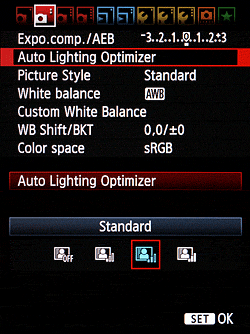
The Auto Lighting Optimizer function from the 50D has been retained unchanged for the Canon 60D. It allows the photographer to expose for the highlights, and then the camera adjusts the image to open up the shadows during image capture. On the Canon 60D, ALO has four settings, including Off, Low, Medium, or Strong.
Highlight Tone Priority
The Canon 60D also retains the 50D's Highlight Tone Priority function, which biases the dynamic range to retain more detail in the highlight areas -- important for wedding photographs, where white dresses typically have blown detail.
Noise Reduction

The Canon 60D offers two types of adjustable noise reduction. Long Exposure noise reduction can be performed for exposures one second or longer, and works by taking a second "dark frame" of equal duration with the shutter closed, and then subtracting it from the first frame. This reduces or eliminates most noise generated by the sensor during long exposures at low ISOs, but can make noise worse at higher ISOs (at ISO 1,600 and above). Available settings are Off, Auto and On. The 60D also offers the user four levels of high ISO sensitivity noise reduction. Options are Disable, Low, Standard, and Strong.
Creative effects

New for the Canon 60D are a series of Creative Filter functions, similar to those seen previously in the company's PowerShot compact camera models, and fairly common in digital SLRs from rival manufacturers. The Canon 60D's creative filters include Soft Focus, Grainy Black & White, Toy Camera effect (which has strong vignetting and some color shift), and Miniature Effect (which simulates shallow depth of field by applying a graduated blur near opposite edges of the image.) The strength of each effect is adjustable, as is the angle of the miniature effect. The Canon 60D also offers a selection of aspect ratio settings in-camera, allowing photographers to shoot their images with a specific print format in mind, avoiding the need to manually crop images in post-processing.
Dust reduction

The Canon 60D includes Canon's EOS Integrated Cleaning System, first introduced on the EOS Rebel XTi camera. The camera's Self-Cleaning Sensor Unit uses a piezoelectric element to shake dust particles off of the low-pass filter in front of the sensor. The dust is then trapped by an adhesive strip along the base, preventing it from causing further nuisance. Cleaning is engaged each time the camera is powered up or shut down, or manually through the "clean now" function. The second part of the cleaning system involves post processing with a compatible personal computer and the supplied Digital Photo Professional software. Via a menu option, the camera maps any stubborn dust spots that remain on the sensor after cleaning, saving their locations as Dust Delete Data that can subsequently be used to subtract the spots during post-processing. A third option includes a manual sensor cleaning function which raises the mirror and allows users to clean dust that may have stuck to the low-pass filter.
Connectivity
For transferring data to a computer or PictBridge-compatible printer, the Canon 60D includes a standard USB 2.0 High Speed connection. The Canon 60D can also be connected to high-definition displays via its mini HDMI output, which features Consumer Electronics Control (HDMI-CEC) compatibility, allowing certain playback functions to be controlled from the attached display's remote control. For photographers still using standard-definition equipment, the Canon 60D also includes a composite audio / video output connection, which is NTSC / PAL switchable. The standard-definition video cable is included in the product bundle, but the HDMI cable is not.
Other connectivity includes a 3.5mm external stereo microphone input, and a remote control port compatible with the optional wired Canon RS-60E3 Remote Switch. The Canon 60D is also compatible with the wireless RC-1, RC-5, and RC-6 infrared remote controllers.
Storage
The Canon 60D stores images on Secure Digital cards, including both Secure Digital High Capacity (SDHC), and the latest generation Secure Digital eXtended Capacity (SDXC) types. The Canon 60D is also compatible with Eye-Fi's WiFi-capable SD cards, and includes support for checking Eye-Fi card status on the 60D's LCD display.
Power
The Canon 60D uses the same LP-E6 battery pack that's used in the EOS 7D, but is incompatible with the battery packs previously used by the EOS 20D, 30D, 40D, and 50D. Canon says that the EOS 60D is capable of capturing up to 1,100 shots with flash usage, or 1,600 shots without flash. The Canon 60D also includes a built-in secondary battery, used to maintain the correct date and time when the main battery pack is removed or discharged. The secondary battery charges automatically when the removable battery is inserted, and when fully charged, can maintain the camera's clock for around three months. For long-term power, such as in studio shooting, the Canon 60D is compatible with the company's ACK-E6 AC Adapter Kit.
Accessories
The Canon 60D is compatible with the newly designed battery grip, which also provides duplicate controls for portrait shooting. Canon has also introduced a new E2 hand strap with the Canon 60D, addressing some users' concerns that neck straps can be restrictive, or simply get in the way, especially when you're using the Vari-angle LCD screen.
Source: http://www.imaging-resource.com/PRODS/E60D/E60DA.HTM

The design of the Canon 60D is slightly smaller, and more specifically aimed at the advanced amateur market, better fitting into the niche occupied by the Nikon D90 and now the D7000, while the Canon 7D remains a better match for the Nikon D300S, as both are cameras aimed more toward those making money with their photographs. The redesign still mostly adds and improves features, like the 18-megapixel sensor, Full HD Movie mode, and Vari-angle LCD, but there's at least one feature deletion that is a little frustrating, which we'll get to shortly.
As mentioned in the overview, the Canon 60D has a few more consumer-friendly features to go along with its consumer-friendly design. In addition to the Scene modes that have always accompanied this level of SLR, Canon now includes many image and video editing features right in the camera. Much of what was introduced in the 7D, including the color-detecting metering system and leveling features, made it into the Canon 60D, but along with those changes came a simplification of controls and a downsizing of the camera body. The one feature unique to the EOS 60D among Canon's SLRs is the Vari-angle LCD, brought over from the PowerShot line.
Look and feel
Anyone who thought the 50D was a little too bulky will appreciate the Canon 60D's smaller size and reduced weight. Body-only weight including battery and card has decreased by 1.5 ounces (43g) to 27.5 ounces (1.72 pounds, 779g), despite the swivel screen. The body is made of a mixture of ABS resin, polycarbonate resin, and polycarbonate resin with a special conductive fiber, presumably for EMI (electromagnetic interference) shielding. The frame is aluminum and polycarbonate enhanced with glass fiber. Dimensions are 5.7 x 4.2 x 3.1 inches (145 x 106 x 79mm), a little bit shorter and less wide than the 50D, and just a bit thicker overall from the lens mount to the LCD thanks largely to the swiveling LCD.
Canon did not detail just how many environmental seals that the EOS 60D has, but they did say that it is a "robust, densely packed compact body with dust and water resistance." As you can see in the two diagrams at right, the EOS 60D's sealing is fairly extensive.
The Canon 60D's grip is smaller, with a nice indentation just inside the grip to help improve your hold, something we've long appreciated in Nikon SLR designs. It's less noticeable from the front, but there's still an indentation for the middle finger to quickly align your hold.
Also in that indentation you'll find the infrared remote control window, something that's long been absent on the 60D's predecessors, yet included on the digital Rebels. Indeed, the omission dates all the way back to the original Canon consumer digital SLR, the D30, introduced in 2000.

Upper right of the lens mount are four holes for the new mono microphone. A stereo microphone jack is also built into the Canon EOS 60D for better quality movie recording.
From the top you see the nice EF-S 18-135mm f/3.5-5.6 IS lens, equivalent to a 28.8-216mm lens on a full-frame 35mm camera. Note that the lens is not USM (ultrasonic motor) drive, so it makes a little noise while focusing, unlike the 28-135mm lens that was bundled with the 50D. The Mode dial on the left shoulder is a little different. First it omits the longstanding A-DEP setting that most people probably didn't use (it allows you to set your desired depth of field using AF points), and second, there's a button in the middle that you use to unlock the Mode dial. This is not new to EOS, but it is new to their digital SLRs (my old EOS Elan had a locking Mode dial). Many will love it, many will hate it. It's easy enough to learn once you're used to your camera, and prevents you from accidentally changing the exposure mode.

Differences on the right side start with the tapered LCD screen. Users of the 7D may also notice that the four buttons across the top of the LCD have only one function, not two. In fact, it gets even more straightforward: the settings that each button adjusts appears beneath it on the LCD. No more looking all over the LCD to find the setting you want to change, and no more guessing which dial to use to change it; both will work. That is new, and makes good sense.
Canon 60D Technical details
Sensor
The Canon 60D's 18.0-megapixel, APS-C sized CMOS image sensor raises the resolution slightly from the Canon 50D's 15.1 megapixels, accompanied by a decrease in photodiode pitch from 4.7µm to 4.3µm. With dimensions of 22.3 x 14.9mm, the overall sensor size is unchanged, yielding the same 1.6x focal length crop. The new sensor also retains a four-channel readout design, like that of its predecessor.
The maximum image dimensions for both JPEG and Raw still image shooting are 5,184 x 3,456 pixels. For Raw shooting, two reduced resolution options are available -- mRaw (3,888 x 2,592 pixels), and sRaw (2,592 x 1,728 pixels). JPEG shooters have four reduced resolution options -- 3,456 x 2,304 pixels, 2,592 x 1,728 pixels, 1,920 x 1,280 pixels, and 720 x 480 pixels.
Processor
Canon has retained their DIGIC 4 image processor in the EOS 60D. With increased resolution, but the same image processor and sensor readout design, something had to give. The Canon 60D's burst shooting speed hence falls to 5.3 frames per second, down from 6.3 frames per second in the 50D. Maximum burst depth is essentially unchanged, however, at 16 Raw images, or 58 large / fine JPEG images.
Sensitivity
Despite the increased resolution, and the corresponding decrease in photosite size, the Canon EOS 60D has an ISO sensitivity range of ISO 100 to 6,400 equivalents in 1/3 EV increments, with the ability to extend to ISO 12,800 equivalent. While the expanded range is unchanged from that of the Canon EOS 50D, the ISO 6,400 position has been moved inside the standard range, rather than being provided as an expanded setting. This is an indication of Canon's confidence in the 60D's noise performance. The Canon 60D also offers an Auto ISO function, which operates within the standard ISO 100 to 6,400 range. Basic Zone operating modes limit sensitivity to ISO 3,200 equivalent.
Autofocus
The Canon 60D's AF sensor is unchanged from the 50D, and features a 9-point diamond array, with nine cross-type f/5.6 autofocus points, meaning that they're all sensitive to vertical or horizontal lines. Nestled in the center is an additional precision AF sensor that is arrayed diagonally and used when you mount a lens of f/2.8 or faster. It has the advantage of detecting horizontal, vertical, and diagonal lines. All nine AF points can be selected automatically or manually, and the autofocus sensor has a working range of -0.5 to 18 EV (at 23°C / ISO 100). The Canon 60D includes the ability to detect the light source (including the color temperature and whether or not the light is pulsing), and then take these into account and microscopically shift the focus as necessary. Autofocus modes include One-shot, Predictive AI Servo AF, and AI Focus AF, which automatically selects between the One-shot and AI Servo modes.
Unlike the 50D and 7D, the Canon 60D lacks the Lens AF Microadjustment custom function, which allows you to tune the camera's autofocus to compensate for lenses that back or front-focus. Not all lenses are tuned just right, but this tool can help make a slightly soft lens a whole lot better. It's a shame of an omission.
Exposure
The Canon 60D provides a full complement of exposure modes, split into two distinct groups -- the Basic and Creative zones. The Basic zone comprises Full Auto, Flash Off, Creative Auto, Portrait, Landscape, Close-up (Macro), Sports, and Night Portrait modes. The Creative zone includes Program, Shutter-priority, Aperture-priority, Manual, and Bulb. There are also a Camera User setting, for registering settings for quick recall, and a Movie mode.
Metering
The Canon 60D inherits Canon's latest metering system, previously seen in the EOS 7D and Rebel T2i. Where the 50D used a 35-zone metering sensor, the Canon 60D now includes a 63-zone iFCL sensor, which stands for Intelligent Focus, Color, and Luminance metering. The name hints at how the sensor works: the iFCL chip has a dual-layer design with each layer sensitive to different wavelengths of light, allowing subject color to be taken into account when determining exposure. Information on focusing points is also taken into account in metering calculations. In this area, the Canon 60D's iFCL chip differs from that of the EOS 7D, taking account of the 60D's nine-point AF, as distinct from the 19-point system in the 7D.
The Canon 60D's exposure metering options include 63-zone Evaluative, Center-weighted Average, Partial (6.5% of image frame at center), and Spot (2.8% of image frame) options. Metering sensitivity range is specified at 0 to 20 EV (at 23°C/73°F, with EF 50mm f/1.4 USM lens, ISO 100). One notable change is that the Canon 60D now offers a wider exposure compensation range of +/- 5 stops, versus the +/- 3 stop range of the 50D. Granularity can still be adjusted, with a choice of either 1/3 or 1/2 EV steps. The Canon 60D also offers automatic exposure bracketing, within a range of +/- 2 stops, with the same step size choices.
Shutter
Like the 50D, the Canon 60D offers shutter speeds ranging from 1/8,000 to 30 seconds, plus a bulb position. Maximum flash x-sync is at 1/250 second. The Canon 60D's electronically controlled, vertical-travel, mechanical focal-plane shutter still has a rated life of 100,000 cycles.
White balance
The Canon 60D offers a full range of White Balance settings, including six presets, an Auto setting (3,000 to 7,000K), a Custom setting, and the ability to directly select a Kelvin color temperature. The six presets include Daylight (5,200K), Shade (7,000K), Cloudy (6,000K), Tungsten (3,200K), White fluorescent (4,000K), and Flash. The Custom setting (2,000 to 10,000K) bases color balance on a previous exposure, meaning you can snap an image of a white card and then base the color temperature on that image. The Kelvin setting allows direct entry of a color temperature between 2,500 and 10,000K in 100K increments.
A White Balance bracketing option snaps only one image, then writes three successive files from that single image. Bracketing steps are from -/+ 3 stops in whole-step increments. (Each stop corresponds to five mireds of a color conversion filter, for a total range of +/- 15 mireds. This corresponds to about a +/- 500K shift at a normal daylight color temperature of 5,500K.) There's also a White Balance Shift function, which lets you bias the color balance on green / magenta and blue / amber axes, within a +/-9 stop range in full-stop increments.
Flash
The Canon 60D includes a built-in popup flash, and a hot shoe for external flash strobes, but lacks the PC Sync terminal offered by the 50D and its predecessors. Maximum flash X-sync is 1/250 second. The Canon 60D's popup flash has a guide number rating of 43 feet (13 meters) at ISO 100, translating to a range of about 15 feet at ISO 100 with an f/2.8 lens. (Reasonably powerful, but not dramatically so.) The Canon 60D gives you a great deal of control over flash exposure, allowing you to adjust flash and ambient exposure independently of each other. Flash exposure compensation is possible within a +/- 3 EV range, in one-half or one-third EV increments. This makes it very easy to balance flash and ambient lighting for more natural-looking pictures.
When attached via the hot shoe, three specific Canon external flash strobes -- the Speedlite 270EX, 430EX II, and 580EX II -- can be configured directly from the 60D's own rear LCD display. In addition to its hot shoe, the Canon 60D's flash can also serve as a built-in Speedlite transmitter, allowing it to control one or more compatible Canon strobes wirelessly. The Canon 60D uses E-TTL II flash metering for both the built-in and compatible external flashes, which include the more recent Canon EX-series strobes.
Viewfinder
The Canon 60D features an eye-level pentaprism viewfinder similar to that of the 50D, but with slightly improved 96% coverage (our tests show it to be a little better than 96%). By way of comparison, the Canon 7D has 100% coverage, and the 50D has 95% coverage. The viewfinder magnification is unchanged from the 50D, at 0.95x (-1m-1 with 50mm lens at infinity), equating to a 27 degree field of view. Also unchanged is the eyepoint: 22mm from the center of the eyepiece lens.
Just like the 50D, the Canon 60D provides a diopter adjustment range of -3.0 to +1.0m-1. It also retains the its predecessor's ability to exchange focusing screens, and comes bundled with the same Ef-A Precision-matte focusing screen by default.
LCD
Probably the most notable change on the exterior of the Canon 60D is its Vari-Angle LCD display, appearing for the first time in an EOS-series camera. The tilt mechanism allows the LCD to be folded out 90 degrees to the left of the 60D's body, while the 270-degree swivel mechanism allows the screen to be turned 180 degrees to face upward or forward, or 90 degrees in the opposite direction to face directly downward. This also allows the LCD to be stowed facing inward, offering a modicum of protection against light bumps, scratches, and fingerprints.
The Canon 60D's screen comprises a three-inch Clear View TFT LCD panel -- the same diagonal size as the 50D's display, but with a wider 3:2 aspect ratio that matches that of the imager, rather than the 4:3 aspect ratio panel of the 50D. The change of aspect ratio also brings an increase in dot count from 920k to 1,040k dots, which roughly equates to a 720 x 480 pixel array. The Canon 60D's panel has 100% coverage, and includes a scratch-resistant fluorine coating. Display brightness is adjustable in seven steps.
Live View
The Canon 60D retains the Live View functionality from the 50D largely unchanged. The live view stream can be displayed either on the camera's 3.0-inch LCD panel, or on a tethered Windows or Macintosh computer using Canon's EOS Utility software. Three focus modes are offered in Live View mode, each providing advantages and disadvantages. In Quick mode, the Canon 60D drops the mirror back down to use the phase-detect autofocus sensors for focusing, potentially offering faster autofocusing operation, but with an interruption to the live view feed, and more noise from the mirror mechanism. In Live mode, the Canon 60D instead uses contrast-detect autofocus on data from the image sensor. The autofocus operation itself is slower, but there's no delay to lower and raise the mirror, nor any noise from mirror operation, and the Live View mode remains uninterrupted. Since the AF operation is performed using sensor data, contrast detection can provide more accurate focusing if there's sufficient contrast in the subject, and the focus point can be moved anywhere within the image frame, except for the extreme edges. Finally, Live Face Detection mode operates identically to Live mode, except that it adds the ability to detect faces in the image frame, and automatically sets focus on the dominant (or user selected) face.
The Canon 60D Live View mode also allows manual focusing, and provides a focus-assist zoom function that allows a portion of the scene to be viewed at either 5x or 10x magnification, making it much easier to perform fine manual focusing adjustments. The live view stream has a 30 frames-per-second refresh rate, and it is possible to overlay grids on the display to help with precise framing. Two silent shooting modes are available that reduce noise from the camera's shutter mechanism. In Silent Shooting mode 1, the 60D uses an electronic first curtain shutter, removing the need to close and reopen the mechanical shutter between Live View terminating, and the image exposure starting. It also reduces noise further by slowing recocking of the mechanical shutter's second curtain after exposure. Silent Shooting mode 2 does the same, but also delays the slowed recocking of the second curtain until the shutter button is released, allowing the photographer to select an appropriate moment when the noise will cause least disturbance.
Movie
Brand new to the Canon 60D is its movie recording capability, fast becoming a common function even among entry-level DSLRs, and at this point an absolute must-have feature for an enthusiast camera. The Canon 60D's video functionality is largely similar to that of the consumer-grade Rebel T2i model, but with the addition of the audio levels control functionality that's available in the 5D Mark II v2.0.4 update, and the wind cut filter function from the 7D.
Canon has provided three choices for movie resolution, all recorded as progressive scan video using H.264 compression. For High Definition fans, there's a 1,920 x 1,080 pixel mode -- commonly known as Full HD or 1080p -- saved at either 30, 25, or 24 frames per second. There's also a 1,280 x 720 pixel (720p) mode recorded at either 60 or 50 frames per second. Finally, there's a standard-definition 640 x 480 pixel (VGA) mode which is also recorded at either 60 or 50 frames per second.
The Canon 60D also offers the company's VGA crop function, as seen in the Rebel T2i, which works by simply cropping and recording the centermost 640 x 480 pixels from the sensor. This yields an effective 7x fixed zoom without interpolating the video. Of course, simply cropping the center of the image means that everything (including image noise) will be recorded at 1:1, so video has noticeably higher quality with the crop disabled. Still, for consumers who may well not be able to afford expensive telephoto lenses and only need standard-def output, it's an interesting feature.
For sound capture, the Canon 60D includes both an internal, monaural microphone, and an external 3.5mm stereo microphone jack, and movie audio is captured as 16-bit, 48KHz linear PCM. The audio levels function mentioned previously provides 64-step control of audio gain, although the 60D can also be set to control levels automatically if desired. The wind-cut filter function acts similarly to that from the EOS 7D, but can optionally be disabled. When active, it reduces recording levels below 100 hertz.
In Movie mode, the Canon 60D provides both Program auto and Manual exposure control, but not Aperture- or Shutter-priority. When using Manual exposure, 60D videographers can set the shutter speed, aperture, and ISO sensitivity (optionally -- Auto ISO is available) before recording starts, but these variables can't be changed during video capture. Canon's Highlight Tone Priority function is available when using Manual exposure. For Program exposure, metering is locked to Center-weighted unless Face Detection is enabled, in which case Evaluative metering is used. In either case, +/-3.0 EV of exposure compensation is available in 1/3 or 1/2 EV steps, and it's also possible to use the autoexposure lock function to prevent the exposure level changing during recording. Available shutter speeds for movie recording range from 1/4,000 to 1/30 second, if recording at 30, 25, or 24 frames per second, and from 1/4,000 to 1/60 second if recording at 50 or 60 frames per second. Movie sensitivities range from ISO 100 to 6,400 equivalents. The same White Balance and Picture Style settings as in still image recording are also applicable for video capture.
Electronic level
The Canon 60D provides a dual-axis electronic level function, reminiscent of that previously seen in the EOS 7D. The 60D's electronic level is shown on the rear-panel LCD display when in the correct display mode, both for live view and regular shooting. The level gauge can also be shown both on the top-panel status LCD display, and the small info display in the optical viewfinder, by pressing the Set button, if configured to do so. The electronic level display functions in one-degree increments.
Copyright info
As first seen in the Canon 7D, you can input copyright information right on the Canon 60D, as well as delete it at will. Captured images are tagged with the copyright information in the EXIF header, and is accessible in many Windows and Macintosh image editors, although it's easy to change or remove after the fact. The copyright information function is now available in models spanning all levels of Canon's digital SLR lineup, from entry level to professional.
Vignetting correction
The Canon 60D retains the Lens Peripheral Illumination Correction function that debuted in the 50D. Also known as vignetting correction, this function automatically reduces the severity of lens vignetting, which is visible as shading in the corners of an image. The function can be disabled, and works by default with a subset of Canon's most common EF-mount lenses. Data for additional lenses can be uploaded to the camera via the EOS Utility software, as needed. The Lens Peripheral Illumination correction function will work for any focal length, f-stop, or focus distance.
Auto Lighting Optimizer
The Auto Lighting Optimizer function from the 50D has been retained unchanged for the Canon 60D. It allows the photographer to expose for the highlights, and then the camera adjusts the image to open up the shadows during image capture. On the Canon 60D, ALO has four settings, including Off, Low, Medium, or Strong.
Highlight Tone Priority
The Canon 60D also retains the 50D's Highlight Tone Priority function, which biases the dynamic range to retain more detail in the highlight areas -- important for wedding photographs, where white dresses typically have blown detail.
Noise Reduction
The Canon 60D offers two types of adjustable noise reduction. Long Exposure noise reduction can be performed for exposures one second or longer, and works by taking a second "dark frame" of equal duration with the shutter closed, and then subtracting it from the first frame. This reduces or eliminates most noise generated by the sensor during long exposures at low ISOs, but can make noise worse at higher ISOs (at ISO 1,600 and above). Available settings are Off, Auto and On. The 60D also offers the user four levels of high ISO sensitivity noise reduction. Options are Disable, Low, Standard, and Strong.
Creative effects
New for the Canon 60D are a series of Creative Filter functions, similar to those seen previously in the company's PowerShot compact camera models, and fairly common in digital SLRs from rival manufacturers. The Canon 60D's creative filters include Soft Focus, Grainy Black & White, Toy Camera effect (which has strong vignetting and some color shift), and Miniature Effect (which simulates shallow depth of field by applying a graduated blur near opposite edges of the image.) The strength of each effect is adjustable, as is the angle of the miniature effect. The Canon 60D also offers a selection of aspect ratio settings in-camera, allowing photographers to shoot their images with a specific print format in mind, avoiding the need to manually crop images in post-processing.
Dust reduction
The Canon 60D includes Canon's EOS Integrated Cleaning System, first introduced on the EOS Rebel XTi camera. The camera's Self-Cleaning Sensor Unit uses a piezoelectric element to shake dust particles off of the low-pass filter in front of the sensor. The dust is then trapped by an adhesive strip along the base, preventing it from causing further nuisance. Cleaning is engaged each time the camera is powered up or shut down, or manually through the "clean now" function. The second part of the cleaning system involves post processing with a compatible personal computer and the supplied Digital Photo Professional software. Via a menu option, the camera maps any stubborn dust spots that remain on the sensor after cleaning, saving their locations as Dust Delete Data that can subsequently be used to subtract the spots during post-processing. A third option includes a manual sensor cleaning function which raises the mirror and allows users to clean dust that may have stuck to the low-pass filter.
Connectivity
For transferring data to a computer or PictBridge-compatible printer, the Canon 60D includes a standard USB 2.0 High Speed connection. The Canon 60D can also be connected to high-definition displays via its mini HDMI output, which features Consumer Electronics Control (HDMI-CEC) compatibility, allowing certain playback functions to be controlled from the attached display's remote control. For photographers still using standard-definition equipment, the Canon 60D also includes a composite audio / video output connection, which is NTSC / PAL switchable. The standard-definition video cable is included in the product bundle, but the HDMI cable is not.
Other connectivity includes a 3.5mm external stereo microphone input, and a remote control port compatible with the optional wired Canon RS-60E3 Remote Switch. The Canon 60D is also compatible with the wireless RC-1, RC-5, and RC-6 infrared remote controllers.
Storage
The Canon 60D stores images on Secure Digital cards, including both Secure Digital High Capacity (SDHC), and the latest generation Secure Digital eXtended Capacity (SDXC) types. The Canon 60D is also compatible with Eye-Fi's WiFi-capable SD cards, and includes support for checking Eye-Fi card status on the 60D's LCD display.
Power
The Canon 60D uses the same LP-E6 battery pack that's used in the EOS 7D, but is incompatible with the battery packs previously used by the EOS 20D, 30D, 40D, and 50D. Canon says that the EOS 60D is capable of capturing up to 1,100 shots with flash usage, or 1,600 shots without flash. The Canon 60D also includes a built-in secondary battery, used to maintain the correct date and time when the main battery pack is removed or discharged. The secondary battery charges automatically when the removable battery is inserted, and when fully charged, can maintain the camera's clock for around three months. For long-term power, such as in studio shooting, the Canon 60D is compatible with the company's ACK-E6 AC Adapter Kit.
Accessories
The Canon 60D is compatible with the newly designed battery grip, which also provides duplicate controls for portrait shooting. Canon has also introduced a new E2 hand strap with the Canon 60D, addressing some users' concerns that neck straps can be restrictive, or simply get in the way, especially when you're using the Vari-angle LCD screen.
Source: http://www.imaging-resource.com/PRODS/E60D/E60DA.HTM


